Prometheus Long-term Storage
Can you use InfluxDB for Prometheus long-term storage?
Lets assume you're using Prometheus to monitor those Docker containers on your homelab, a pretty common use case these days.
Prometheus by default gives you a data retention config of 15days. This can be extended, but it is recommended to use another solution for long-term storage.
For example, lets say we want to implement for our homelab an compliant backup retention policy of 30 days. The use of Prometheus is both not recommended and would require a larger storage hardware.
This example situation can be further worsened depending on the total and throughput of data going to be observed. As a general rule of thumb, the industry expects an observability system to be 50x the size of your systems data profile.
Case study - Signal messages:
- Take a standard Signal 240 character message, some emojis since they cost more bytes, add the excess encryption overhead, and we arrive at an estimated 1.5KB per message
- Assuming 70million active users per month, and assuming each send 20 messages per day, would leave us with 1.4 billion messages / day
- The data volume per the 2h window would be 166.7 GB
And that is without considering that Prometheus splits up the chunks into 512MB chunks, or in our case study, ~300 chunks.
The throughput storage impact is also a scaling issue since the more "real-time" a system is, the more storage chunks / blocks created and stored by Prometheus.
Case study - Grafana Docker stack:
- Take a standard Grafana stack of Docker containers, eg. 6 containers
- Assume 15sec scraping rule for Prometheus, thats 4 data points / minute
- Assume each container collects ~40 metrics, 6 containers leave us with 240 metrics
- Assume each data point is sized as above, at 1.5KB, gives us 1.4 MB / minute
- Or 84 MB / hour, 168 MB / 2h, ~2 GB / day, ~60 GB / month
Or 120 Prometheus storage chunks. It quickly mounts up or we have a maths error somewhere!
Note that for the rest of the article I'll never again return to the topic of storage benchmarking for something other than Prometheus. I really should measure it and compare it, and I might in another post. If you fancy reading that, make sure you are following the RSS for future updates.
Storage options
Grafana Mimir, Thanos, Victoria Metrics and more. You can read a nice comparisson in this handy resource - Kubernetes in my head - Prometheus Long-term Storage.
The issue is not finding the solutions, but picking one.
If you followed any homelab video setups from past few years, you will know the Grafana stack. A good stack for home observability. Most of these older videos use and recommend InfluxDB, usually in the same stacks as Prometheus (used for metrics and alerts).
InfluxDB as a long-term storage for Prometheus becomes more desirable in this context. If you choose it you're not adding a new service and at face value the two options look viable.
| InfluxDB                           | Prometheus                |
| -----------------------------------| ------------------------- |
| Time-series db                     | Time-series metrics       |
| Designed for analytics             | Designed for metrics      |
| Time-series focused query language | Functional query language |
| Broad integrations                 | Broad integration         |
| Compression and downsampling       |                           |
InfluxDB docs show native api's for Prometheus, tooling for it via Telegraf, and guides on the ingestion pipeline.
There's even a CNCF talk from InfluxDB's Paul Dix, discussing native support for Prometheus data ingestion - Integrating Prometheus and InfluxDB - Paul Dix, InfluxData (Intermediate Skill Level)
Data Ingestion, Telegraf
Grafana Telegraf is the default runner recommended for getting data not meant for InfluxDB, into InfluxDB. It's main job is to handle the data formatting.
A common flow is to push data to Prometheus, Prometheus.remote_write to Telegraf, and Telegraf push to InfluxDB.
[telegraf.conf]
[[inputs.http_listener_v2]]
  service_address = ":1234" # Telegraf port
  paths = ["/receive"]
  methods = ["POST"]
  data_format = "prometheusremotewrite"
  read_timeout = "10s"
  write_timeout = "10s"
  max_body_size = "64MB"
  http_headers = {"Connection" = "keep-alive"}
[prometheus.yml]
remote_write:
  - url: "http://telegraf:1234/receive"
Results:
- Data gets to InfluxDB fine.
- Not benchmarked, but may feature some lag due to the extra steps: pushing from Prometheus, writing to disk, pushing to Telegraf, and pushing to InfluxDB.
- Telegraf is a queue / buffer, misconfiguration of data flow will create data mismatches; eg. you flush your buffer too often or not often enough and Telegraf can't write as quickly as you post data; misconfigurations will produce incompatible rates of data across the data sets which will break dashboards, and ultimately an untrustworthy auditing data lake eg. where Prometheus has 4 measurements / second, InfluxDB might feature less result in rate() calculations diverging.
- Introduces the Telegraf service, and adds extra system requirements; on avgerage (for my system) Telegraf eats up 2-3x the amount of memory that Prometheus does.
Data Ingestion, Alloy
Grafana Alloy is a runner / collector, flexible and powerful, and extendable. Designed to replace Promtail, which used to be the defacto collector of hardware or container metrics.
In 2026, Alloy is the recommended way to collect Docker container metrics, via a built-in cAdvisor component and pushing the metrics to Prometheus.
[config.alloy]
livedebugging {
  enabled = true // TODO: remove when not in development
}

// Targets
// > Groups all of the *write components together

prometheus.remote_write "main" {
  endpoint {
    url = "http://prometheus:9090/api/v1/write"
  }
}

prometheus.remote_write "telegraf" {
  endpoint {
    url = "http://telegraf:9273/metrics"
  }
}

// Metrics

prometheus.exporter.cadvisor "main" {
  docker_only = true
  storage_duration = "10m"
}

discovery.relabel "cadvisor_rename" {
    targets = prometheus.exporter.cadvisor.main.targets

    rule {
        target_label = "job"
        replacement  = "integrations/docker"
    }

    rule {
        target_label = "instance"
        replacement  = constants.hostname
    }
}

prometheus.scrape "scraper" {
  targets    = discovery.relabel.cadvisor_rename.output
  forward_to = [ prometheus.remote_write.main.receiver, prometheus.remote_write.telegraf.receiver ]


  scrape_interval = "15s"
}
Config uses Alloy to define a Prometheus cAdvisor scraper, relabel some of the defaults from cAdvisor (minor relabelling, kept for reference), and push the data to two receivers: Prometheus, Telegraf. Telegraf being our data queue to InfluxDB.
Important to use "docker_only" on the cAdvisor definition, otherwise you won't be able to access "machine_cpu" metric, crucial for one of the dashboards.
Also "docker_host = "unix:///var/run/docker.sock"" only, will also stop "machine_cpu" from being scraped.
Speaking of scraping, the the default scrape "storage_duration" is 2m. The increase is required for container restarts. We don't want to flush the data from the previous container too early. Should be increased to 1h minimum, in production.
Results:
- Achieves similar outputs to the Telegraf example.
- Benefit: keeps Prometheus and Telegraf configs clean.
- Benefit: more robust data integrity across the 2 storage options; data is more likely to arrive in sync.
- Benefit: theoretically better latency, but not benchmarked.
- Benefit: centralises configuration around Alloy, as opposed to multiple changes across other services; less service chaining.
Data Ingestion, Alloy + InfluxDB
This relies on InfluxDB documentation that reports "native" api support for Prometheus via "/api/v*/write".
We continue to use Alloy as the main runner, but we remove the need for Telegraf. We instead define an Influx
[config.alloy]
...

prometheus.remote_write "influx" {
  endpoint {
    url = "http://influxdb:8086/api/v2/write?bucket=mybucket&org=myorganisation"

    bearer_token = "BearerTokenGoesHere=="
  }
}

...

prometheus.scrape "scraper" {
  targets    = discovery.relabel.cadvisor_rename.output
  forward_to = [ prometheus.remote_write.main.receiver, prometheus.remote_write.influx.receiver ]
  scrape_interval = "15s"
}
This uses the /api/v2/write api from InfluxDB which should have native support for Prometheus.
Results:
- We are using InfluxDB v2.8, not the latest version v3.
- Critical error: InfluxDB throws ingestion error due to the data schema difference; InfluxDB documentation does mention that Telegraf handles data differently, but I didn't expect a full stop data compatibility error.
- Fully blocked on this path.
Visualization, Grafana
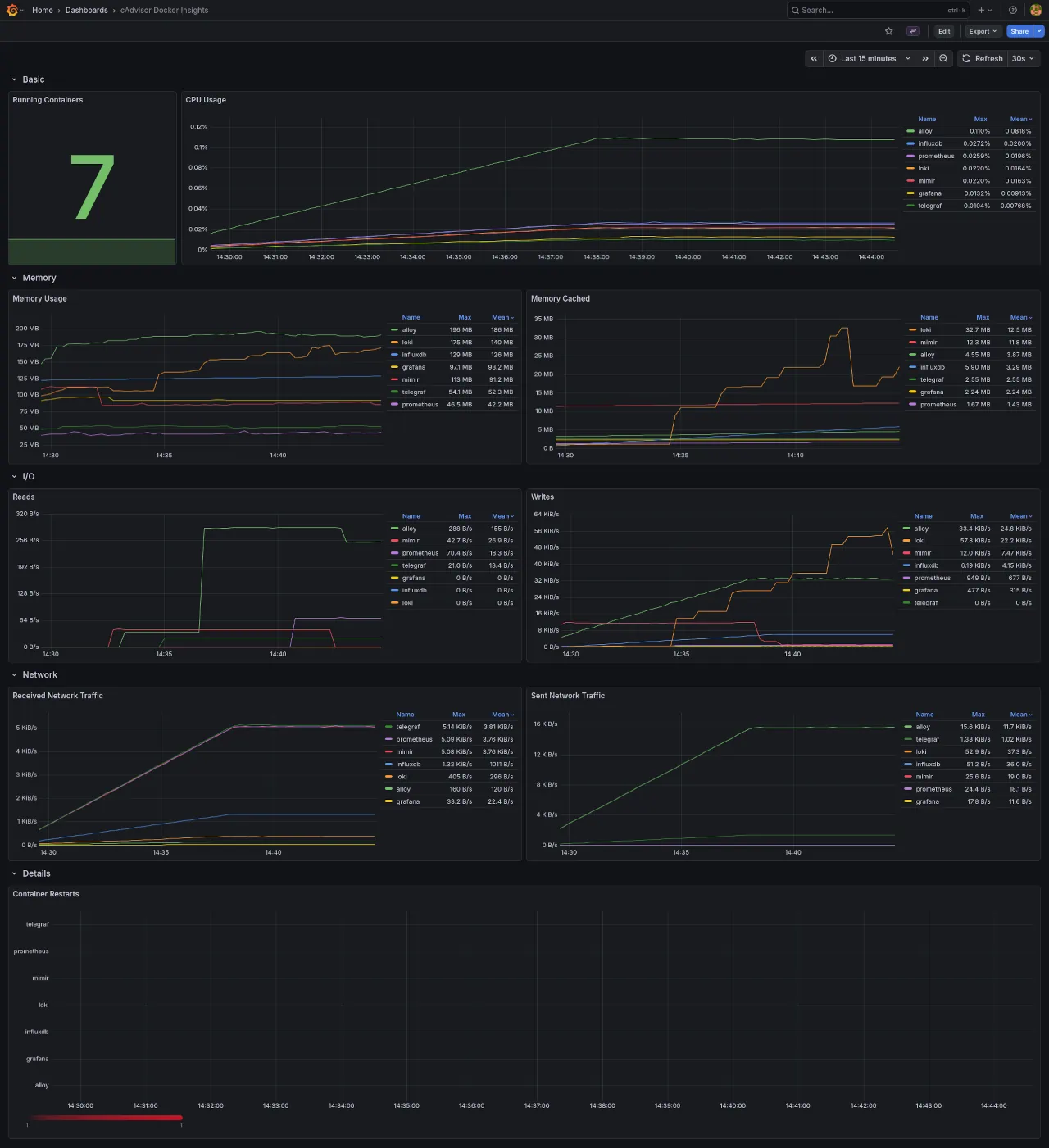
Using Grafana to visualize our observability data via a generic dashboard for cAdvisor from the open catalog.
Why cAdvisor?
If you didn't notice from the Alloy configs, we use the prometheus.exporter.cadvisor which uses cAdvisor (repo) under the hood to measure usage and performance of Docker containers. A standard library for this process, but unclear how the abstraction affects performance or configures cAdvisor.
The dashboard used as a base measures CPU, memory, I/O, network traffic, container restarts, Grafana dashboards / cAdvisor Docker Insights. We will however edit this dashboard queries later due to some fundamental data representation bugs.
Dashboards, Prometheus
With the above dashboard and Prometheus as a data source, we have no issues and the system is performing nominally.
The dashboard is designed with Prometheus in mind so all the panels use PromQL queries.
Dashboards, InfluxDB
Prometheus will contain our 12-24h data, and be used for alerting.
InfluxDB will contain all our historical data, and we are using the older v2.8 since v3 has significant api and license changes.
To make the same dashboard work with InfluxDB, we need to make the InfluxDB data queries mimick PromQL queries.
Our ultimate test is whether we can achieve like for like dashboard parity.
First blocker, InfluxDB doesn't use PromQL. It uses InfluxQL or Flux as query languages, where:
- Flux is a functional style time-series query language
- InfluxQL is a SQL-like query language
Given PromQL is also a functional query language, we should use Flux to recreate the dashboard queries.
More details in the full parity chart between the two languages, InfluxQL and Flux parity chart.
Note, this is only true for InfluxDB v2.8. InfluxDB v3 adopted SQL in full, and renamed Flux to InfluxQL. See the InfluxDB product chart for more info see this docs page Understanding InfluxDB products
InfluxQL -> SQL
Flux     -> InfluxQL
Panel, Running Containers, Prometheus
Dashboard: cAdvisor
Panel: Running container
Data source: Prometheus

PromQL query.
count(count(container_last_seen) by (name))
A better, semantic query variation.
sum by (name) (count(container_last_seen))
The metric "container_last_seen" is a Gauge as defined by cAdvisor, in their docs Monitoring cAdvisor with Prometheus.
First we "count()" all the "container_last_seen` returning the total for all containers. For example, if we have three stacks running, and each contained a grafana service, we would receive the count value of 3
Then "sum by (name)()" or recount by name, in order to get the distinct number of services. Returning to the above example, this sum will return 1.
With "sum by" it's easier to reason what we expect from the output: a sum of container_last_seen counts.
InfluxDB, working with data
InfluxDB stores Prometheus metrics with the combination of _measurement and _field. The measurement will stay constant across all the queries.
From the docs, InfluxDB, key concepts, measurement:
The measurement acts as a container for tags, fields, and the time column, and the measurement name is the description of the data that are stored in the associated fields. Measurement names are strings, and, for any SQL users out there, a measurement is conceptually similar to a table. The only measurement in the sample data is census. The name census tells us that the field values record the number of butterflies and honeybees - not their size, direction, or some sort of happiness index.
The docs also raise some interesting questions:
- "v1.5 and earlier, all Prometheus data goes into a single measurement named _ and the Prometheus measurement name is stored in the name label"; Odd statement, since in the data we see a common
_measurementvalue for all "prometheus_remote_write" metrics;_fieldand other _* values are used; the measurement name is actually stored under_field, and we also have a name property which in our case is the name of the observed container. - "In InfluxDB v1.6 or later, every Prometheus measurement gets its own InfluxDB measurement."; We are using InfluxDB v2.8 and this is not what we see; every measurement is stored under "prometheus_remote_write" and each measurement gets it's own field
- "This format is different than the format used by the Telegraf Prometheus input plugin." - Since we are using Telegraf, could it be why we see inconsystencies?; no follow-on links or comments are present in the docs, so a bit more sign-posting would be ace.
Documentation source for the above quotes, InfluxDB, example parse Prometheus to InfluxDB.
Some answers to those questions:
- The "_measurement" and "_field" combo usage is referenced by docs to the InfluxDB Prometheus API v2. Where v1 format actually matches the above statements. A reference of this can be found, Calculate quantile values from Prometheus histograms. This suggests that v1 queries only require 1 filter by "_measurement" where it matches "container_last_seen" from cAdvisor. Whilst v2 requires 2 filters, one "_measurement" and one "_field". First one matching "prometheus" or "prometheus_remote_write", second one matching cAdvisor "container_last_seen"
- The two fromats are also discussed in Prometheus metric parsing formats. Here the explanation is more vague because both formats feature the same "_measurement" and "_field" combo, expect where it comes to usage, v1 using "_measurement" for the Prometheus metric name, and v2 using "_field" for the Prometheus metric name.
The system here uses v2 measurement api, so "_field" gets us to the point of selecting the cAdvisor metric we're targeting.
Docs: "The sample recording from Prometheus is stored in value column"
In our case the sample recording is actually stored in the "_value" column.
Lets take the a simplified query and build up from there.
from(bucket: "metrics")
  |> range(start: v.timeRangeStart, stop: v.timeRangeStop)
  |> filter(fn: (r) => r._measurement == "prometheus_remote_write")
  |> filter(fn: (r) => r._field == "container_last_seen")
"range(start: v.timeRangeStart, stop: v.timeRangeStop)" returns the range defined by the Grafana UI, as opposed to a hard-coded value eg. '5m', '6h'
Let's review the query output as JSON, since it's easier to read.
{
  "table": 0,
  "_start": "2026-03-12T12:14:13.928991563Z",
  "_stop": "2026-03-12T...",
  "_time": "2026-03-12T...",
  "_value": 1773317667,
  "_field": "container_last_seen",
  "_measurement": "prometheus_remote_write",
  "container_label_com_docker_compose_config_hash": "271ce3",
  "container_label_com_docker_compose_container_number": "1",
  "container_label_com_docker_compose_image": "sha256:f820",
  "container_label_com_docker_compose_oneoff": "False",
  "container_label_com_docker_compose_project": "base-monitoring-stack",
  "container_label_com_docker_compose_project_working_dir": "~/base-monitoring-stack",
  "container_label_com_docker_compose_replace": "e05564",
  "container_label_com_docker_compose_service": "alloy",
  "container_label_com_docker_compose_version": "2.35.1",
  "container_label_org_opencontainers_image_ref_name": "ubuntu",
  "container_label_org_opencontainers_image_source": "https://github.com/grafana/alloy",
  "container_label_org_opencontainers_image_version": "24.04",
  "host": "e35f",
  "id": "/system.slice/docker-76c4d.scope",
  "image": "grafana/alloy:latest",
  "instance_job": "75c9e",
  "name": "alloy"
}
All the container_label_* entries are from Docker itself, and not related to the architecture described so far, not cAdvisor, not Alloy, not Prometheus, not InfluxDB. Let's filter these out, for now.
Sidenote: the size of the above entry is 1KB, close to the estimated values at the top of the article.
{
  "table": 0,
  "_start": "2026-03-12T12:14:13.928991563Z",
  "_stop": "2026-03-12T...",
  "_time": "2026-03-12T...",
  "_value": 1773317667,
  "_field": "container_last_seen",
  "_measurement": "prometheus_remote_write",
  "host": "e35f",
  "id": "/system.slice/docker-76c4d.scope",
  "image": "grafana/alloy:latest",
  "instance_job": "75c9e",
  "name": "alloy"
}
This is now the expected schema for a container_last_seen metric entry.
How do I develop a feel for InfluxDB data and queries?
The best way to query and develop an feel for the data in InfluxDB is via the InfluxDB query UI.
Navigate to InfluxDB UI / Data Explorer and:
- From top left dropdown toggle the visualization to 'Simple Table' or 'Table' view.
- From right side of the page toggle the "Script writer"
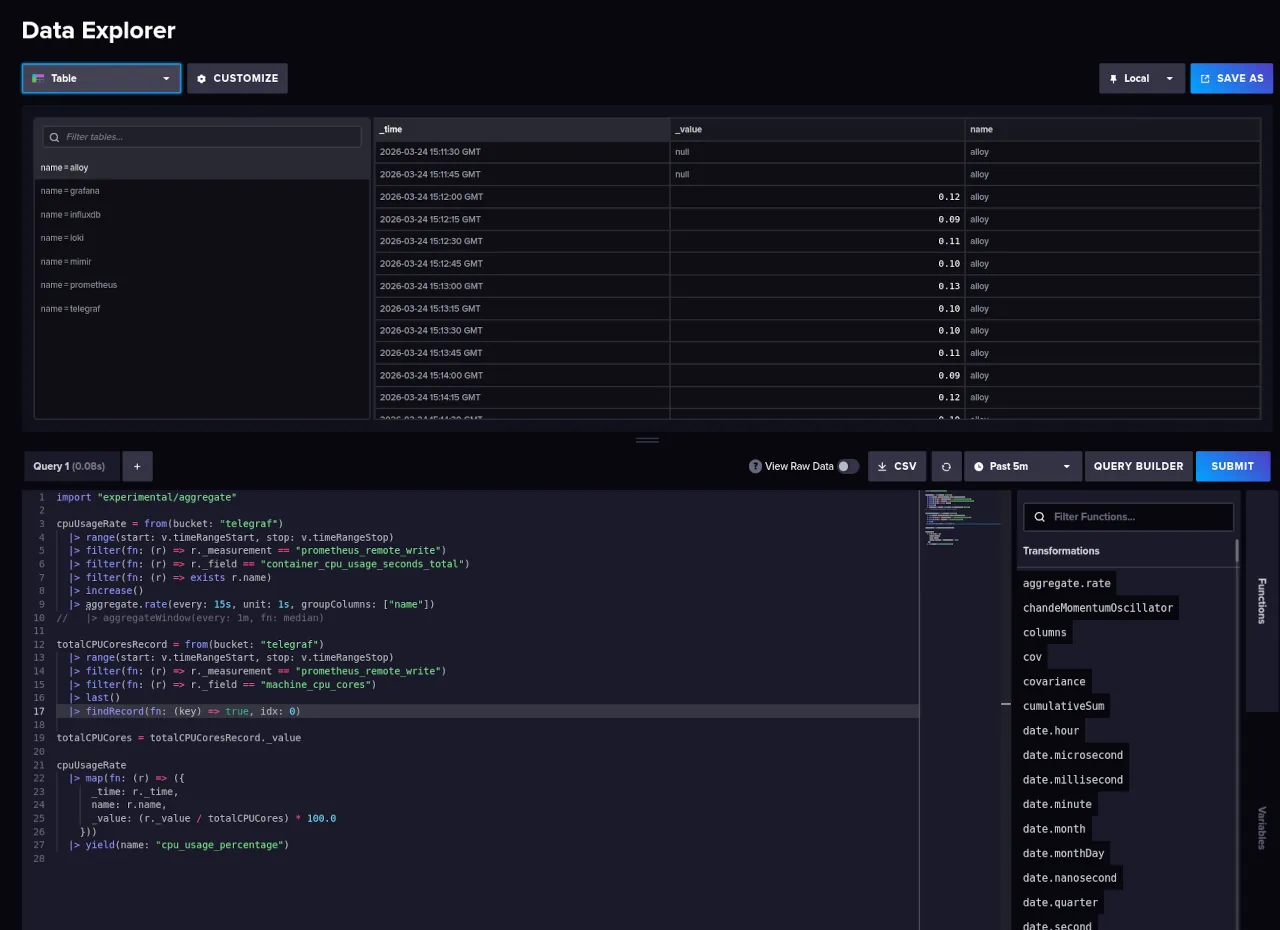
You might be tempted to use Grafana UI / Connections / Data sources / InfluxDB / your_query, but the table UI here is lacking. You'll miss key debug information that is present in InfluxDB Query UI.
The Influx / Data Explorer view shows us the types stored in each column, eg. 'Group string'. And these types will impact the Flux queries. It also shows you the tables produced by a query, or "series".
Metric schema
What if I wanted to see a single Prometheus metrics schema in InfluxDB?
from(bucket: "metrics")
  |> range(start: v.timeRangeStart, stop:v.timeRangeStop)
  |> keys()
  |> keep(columns: ["_value"])
  |> group()
  |> distinct()
Show all the item attributes available in InfluxDB. All the "container_label_*" fields, were removed as mentioned above.
The default schema for all metrics entries:
_start
_stop
_field
_measurement
branch
goarch
goos
goversion
host
instance
job
revision
tags
version
kernelVersion
osVersion
id
major
minor
operation
device
image
name
cpu
failure_type
scope
interface
state
boot_id
machine_id
system_uuid
mode
Metric types
What if I wanted to see all the metric types collected by cAdvisor?
from(bucket: "metrics")
  |> range(start: v.timeRangeStart, stop: v.timeRangeStop)
  |> filter(fn: (r) => r._measurement == "prometheus_remote_write")
  |> group(columns: ["_field"])
  |> distinct(column: "_field")
Produces a list comparable to the ones from cAdvisor, Monitoring cAdvisor with Prometheus
cadvisor_build_info
cadvisor_version_info
container_blkio_device_usage_total
container_cpu_load_average_10s
container_cpu_system_seconds_total
container_cpu_usage_seconds_total
container_cpu_user_seconds_total
container_fs_inodes_free
container_fs_inodes_total
container_fs_io_current
container_fs_io_time_seconds_total
container_fs_io_time_weighted_seconds_total
container_fs_limit_bytes
container_fs_read_seconds_total
container_fs_reads_bytes_total
container_fs_reads_merged_total
container_fs_reads_total
container_fs_sector_reads_total
container_fs_sector_writes_total
container_fs_usage_bytes
container_fs_write_seconds_total
container_fs_writes_bytes_total
container_fs_writes_merged_total
container_fs_writes_total
container_last_seen
container_memory_cache
container_memory_failcnt
container_memory_failures_total
container_memory_kernel_usage
container_memory_mapped_file
container_memory_max_usage_bytes
container_memory_rss
container_memory_swap
container_memory_usage_bytes
container_memory_working_set_bytes
container_network_receive_bytes_total
container_network_receive_errors_total
container_network_receive_packets_dropped_total
container_network_receive_packets_total
container_network_transmit_bytes_total
container_network_transmit_errors_total
container_network_transmit_packets_dropped_total
container_network_transmit_packets_total
container_oom_events_total
container_scrape_error
container_spec_cpu_period
container_spec_cpu_shares
container_spec_memory_limit_bytes
container_spec_memory_reservation_limit_bytes
container_spec_memory_swap_limit_bytes
container_start_time_seconds
container_tasks_state
machine_cpu_cores
machine_cpu_physical_cores
machine_cpu_sockets
machine_memory_bytes
machine_nvm_avg_power_budget_watts
machine_nvm_capacity
machine_scrape_error
machine_swap_bytes
scrape_duration_seconds
scrape_samples_post_metric_relabeling
scrape_samples_scraped
scrape_series_added
up
The values with "container_*" prefix represent cAdvisor metrics.
The values with "machine_*" represent Prometheus hardware metrics.
The values with "scrape_" and "up" are from the Grafana Alloy, from the "prometheus.scrape" block. "up" is "1 if the instance is healthy and reachable, or 0 if the scrape failed.", and "scrape_" represent Prometheus scraping metadata, prometheus.scrape - Scraping Behaviour (Grafana Alloy docs).
All of these represent the "type" of each metric, which will share the above metric schema.
Panel, Running Containers, InfluxDB
Dashboard: cAdvisor [historic]
Panel: Running container
Data source: InfluxDB
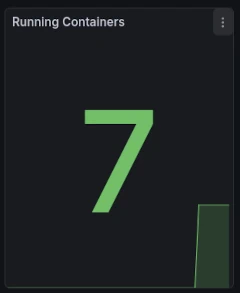
The panel is powered by the following Flux query.
from(bucket: "metrics")
  |> range(start: v.timeRangeStart, stop: v.timeRangeStop)
  |> filter(fn: (r) => r._measurement == "prometheus_remote_write")
  |> filter(fn: (r) => r._field == "container_last_seen")
  |> group(columns:["name"])
  |> distinct(column: "name")
  |> keep(columns: ["_time", "_value"])
  |> count()
The beginning of the query is similar to our simple starter query, and it just narrows down the data to "container_last_seen".
"group()" is interesting, InfluxDB groups data by: taking all the _* columns without _time, _value, and attaching all the remaining columns.
For reference, the PromQL grouping done via "by (name)".
count(count by (name) (container_last_seen))
In InfluxDB we have 2 options:
- We can remove all grouping via an empty call to "group()". This creates an aggregate base, and columns store raw values not groups, making them useful for sum totals.
- Or we organise groups by name, akin to PromQL. Remember from above that "name" is one of the attributes on the metric type, so we will need that as a column. eg. "group(columns: ["name"])"
For this example you should switch the "InfluxDB / Data Explorer" view to "Table", not "Simple table".
Here is a query without "group()"".
from(bucket: "metrics")
  |> range(start: v.timeRangeStart, stop: v.timeRangeStop)
  |> filter(fn: (r) => r._measurement == "prometheus_remote_write")
  |> filter(fn: (r) => r._field == "container_last_seen")
  |> distinct(column: "name")

"distinct()"", will make sure that we're counting services not instances of those services. Here not an issue, but important if you have multiple stacks running, with the same services.
The output, as seen above, is a list of tables matching the amount of containers, where each table contains 1 entry "{ _value, name }". Again this returns a collection of TABLES not values, and we need the values for aggregation.
"group()" will merge the data into one table, and set up for correct aggregation. One table, many metrics.
from(bucket: "metrics")
  |> range(start: v.timeRangeStart, stop: v.timeRangeStop)
  |> filter(fn: (r) => r._measurement == "prometheus_remote_write")
  |> filter(fn: (r) => r._field == "container_last_seen")
  |> group()
  |> distinct(column: "name")
  |> count()

Notice how we have have an extra blank entry?!
We need to filter out empty "name" samples. Unclear why the data is reporting entries with a blank "name".
from(bucket: "metrics")
  |> range(start: v.timeRangeStart, stop: v.timeRangeStop)
  |> filter(fn: (r) => r._measurement == "prometheus_remote_write")
  |> filter(fn: (r) => r._field == "container_last_seen" and r.name != "")
  |> group()
  |> distinct(column: "name")
  |> count()
"keep()" just reduces the data to just what we need, discarding the other columns. In the examples above we've only got "_value" which is actually the original "name" column,
And we need to do the same filtering on the Prometheus dashboard query, with "{name!=""}".
sum by (name) (count(container_last_seen{name!=""}))
Panel, Running Containers, Reflection
Dashboard: cAdvisor [historic]
Panel: Running container
Data source: InfluxDB
InfluxDB Flux queries here are verbose. Most of it, caused by the double filtering of measurement and field.
PromQL is a lot nicer, and I would favor a long-term storage solution with native PromQL support for parity and max comfort.
Overall, this panel port from PromQL to InfluxDB data source is a "PASS".
Panel, CPU Usage, Prometheus
Dashboard: cAdvisor
Panel: CPU Usage
Data source: Prometheus
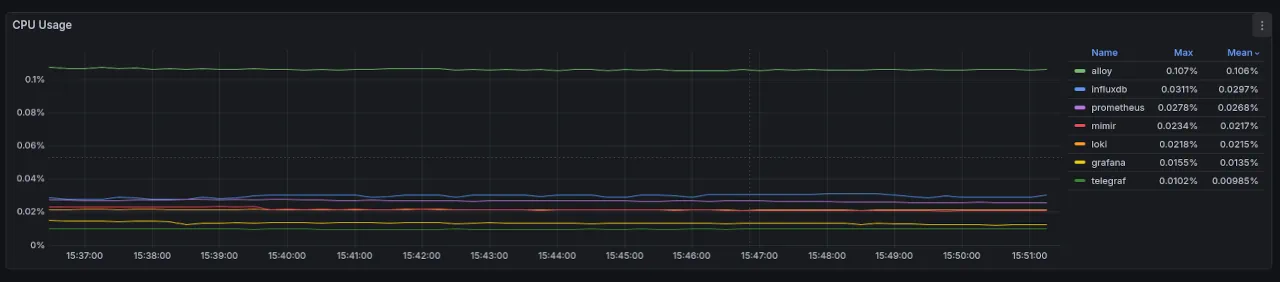
The PromQL query:
sum by (name) (rate(container_cpu_usage_seconds_total{name=~".+"}[1m])) * 100
Starting from the outer level, we are producing a "sum by (name) () " and multiplying by 100 for % rate.
"container_cpu_usage_seconds_total" is reported by cAdvisor as a Counter type of total CPU seconds used averaged across CPU cores.
The chart displays the usage of each service as a % of the total, so the syntax seems odd for now.
"rate()[1m]" will produce an averaged value across the time-range given [1m].
In the "rate()" the outliers are typically removed since Counters are considered generally monotonic, or constantly increasing or decreasing values, eg. when a service is offline you get an outlier. Those metrics are smoothed from the output of "rate()".
The rate here should stay at 1m in order to represent accurate per second values.
A sibling of "rate()" is "irate()", which is recommended for more volatile loads and can be used here to chart more interesting spikes of the CPU use. It should not be used for alerting because of increased noise from said spikes.
The "{name=~".+"}" is a label matcher, here used as a filter. It translates to "filter any name tables with 1 + characters". Here it's used to remove a "sum by (name)()" output entry, which would otherwise alter the figures.
Notice how we simply data the sum or the rates and multiply by 100, will this actually represent CPU usage as a percentage?
No.
In PromQL any "* 100" can be interpreted as a percent value. Here, the "container_cpu_usage_seconds" are actually nano seconds eg "alloy" using 0.0238s, ~2.38ns.
Taking these values and multiplying by 100 just turns these values into seconds, from 2.3ns to 2.3s. Which is not the measurement we got from the service.
Since chart expects percentages, it will report the value as 2.3%.
To get better reading, we need to solve the "usage / number CPUs" formula.
From documentation, "container_cpu_usage_seconds_total" represents sum usage across all CPU cores. We would need to divide the cores to get the change rate. The change rate being a more interesting rate to chart vs aggregate change across all cores.
sum by (name)(
  rate(container_cpu_usage_seconds_total{name=~".+"}[1m])
) / on() group_left() machine_cpu_cores * 100
From cAdvisor metrics we use "machine_cpu_cores" to get the CPUs available. "on() group_left()" changes the right-side data to match the format on the left of the divisor. Without it the "machine_cpu_cores" returns a single table for all "name" columns vs the left query which returns 1 table per "name".
"on() group_left()" is a many-to-one matcher, or a LEFT JOIN in SQL. More info on these methods in the PromQL cheatsheet, https://promlabs.com/promql-cheat-sheet/
Panel, CPU Usage, InfluxDB
Dashboard: cAdvisor [historic]
Panel: CPU Usage
Data source: InfluxDB
Reviewing the steps from Prometheus PromQL we need to:
- Get the values for "container_cpu_usage_seconds_total"
- Get the number of "machine_cpu_cores"
- Calculate the division of the two as a percentage value
For simplicity, we will use variables for formula part.
cpuUsageRate = ...

totalCPUCores = ...

cpuUsageRate
  |> map(fn: (r) => ({
      _time: r._time,
      name: r.name,
      _value: (r._value / totalCPUCores) * 100.0
    }))
  |> yield(name: "cpu_usage_percentage")
The final output should be covering each entry in "cpuUsageRate" and divide the "_value" by the "totalCPUCores", and represent it as a percentage,
For "totalCPUCores" we use:
totalCPUCoresRecord = from(bucket: "metrics")
  |> range(start: v.timeRangeStart, stop: v.timeRangeStop)
  |> filter(fn: (r) => r._measurement == "prometheus_remote_write")
  |> filter(fn: (r) => r._field == "machine_cpu_cores")
  |> last()
  |> findRecord(fn: (key) => true, idx: 0)

totalCPUCores = totalCPUCoresRecord._value
After narrowing / filtering down to "machine_cpu_cores", we fetch the last value of "machine_cpu_cores" i.e. most accurate / recent value. "last()" returns a table and we get the first record in that table via "findRecord()", with idx 0.
"findRecord()" will return the record not the value, so we use another variable to save the "_value" data.
For "cpuUsageRate" query:
cpuUsageRate = from(bucket: "metrics")
  |> range(start: v.timeRangeStart, stop: v.timeRangeStop)
  |> filter(fn: (r) => r._measurement == "prometheus_remote_write")
  |> filter(fn: (r) => r._field == "container_cpu_usage_seconds_total")
  |> filter(fn: (r) => exists r.name)
  |> increase()
  |> aggregateWindow(every: 1m, fn: mean)
  |> derivative()
Continuing the pattern, we narrow the query to "container_cpu_usage_seconds_total" and we filter out any values with empty "name". Unclear why cAdvisor is reporting these value, or what they represent; they are however polluting the data and have to go.
Next is the crucial part, attempting to replicate the "rate()" behavior from PromQL.
"increase()" to normalise any counter resets.
"aggregateWindow(every: 1m, fn: mean)" produces a window averaging similar to "rate()"
"derivative()" helps us convert monotonic counter values to a rate, here defaulting to 1s.
This should translate to "1s average rate across a 1m window".
Final query, variation A:
cpuUsageRate = from(bucket: "metrics")
  |> range(start: v.timeRangeStart, stop: v.timeRangeStop)
  |> filter(fn: (r) => r._measurement == "prometheus_remote_write")
  |> filter(fn: (r) => r._field == "container_cpu_usage_seconds_total")
  |> filter(fn: (r) => exists r.name)
  |> increase()
  |> aggregateWindow(every: 1m, fn: mean)
  |> derivative()

totalCPUCoresRecord = from(bucket: "metrics")
  |> range(start: v.timeRangeStart, stop: v.timeRangeStop)
  |> filter(fn: (r) => r._measurement == "prometheus_remote_write")
  |> filter(fn: (r) => r._field == "machine_cpu_cores")
  |> last()
  |> findRecord(fn: (key) => true, idx: 0)

totalCPUCores = totalCPUCoresRecord._value

cpuUsageRate
  |> map(fn: (r) => ({
      _time: r._time,
      name: r.name,
      _value: (r._value / totalCPUCores) * 100.0
    }))
  |> yield(name: "cpu_usage_percentage")
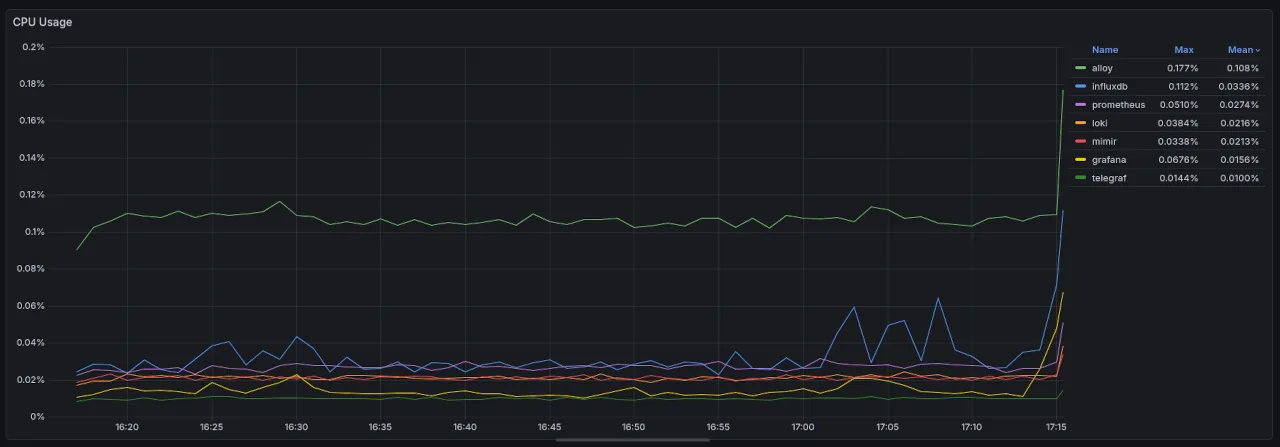
For reference, the PromQL panel for the same time range
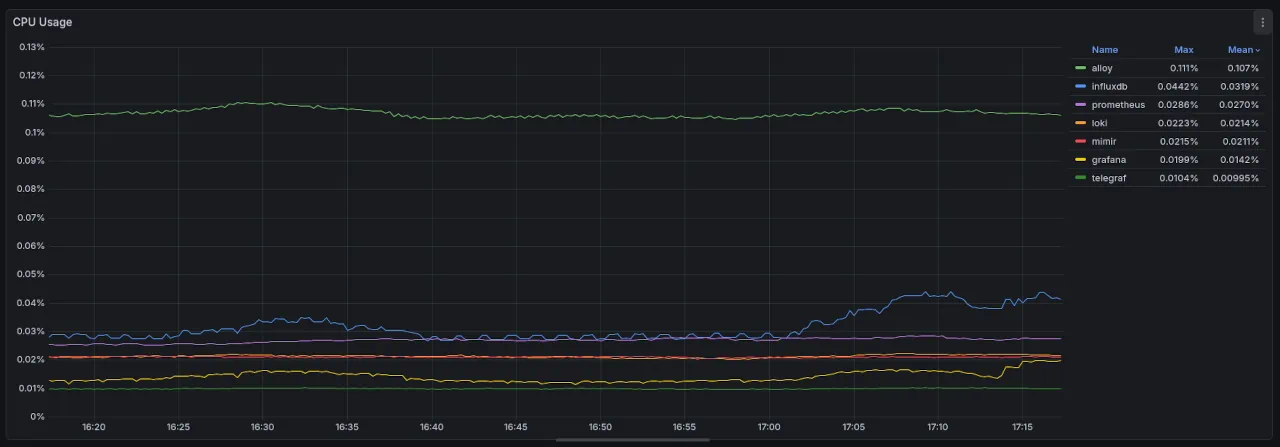
And alternate query, as referenced by InfluxDB, Work with Prometheus Counters.
Final query, variation B:
import "experimental/aggregate"

cpuUsageRate = from(bucket: "telegraf")
  |> range(start: v.timeRangeStart, stop: v.timeRangeStop)
  |> filter(fn: (r) => r._measurement == "prometheus_remote_write")
  |> filter(fn: (r) => r._field == "container_cpu_usage_seconds_total")
  |> filter(fn: (r) => exists r.name)
  |> increase()
  |> aggregate.rate(every: 15s, unit: 1s, groupColumns: ["name"])

...
We use the "experimental/aggregate" module to replicate the "rate()". "groupColumns" applies the aggregation after combining / grouping by that column, here creating an "aggregate.rate" on the "name" column.
This method adds both windowing and extrapolation in comparison to the manual "aggregateWindow()"" example
This is the most accurate proxy to PromQL "rate()" available in InfluxDB, InfluxDB, Work with Prometheus Counters.
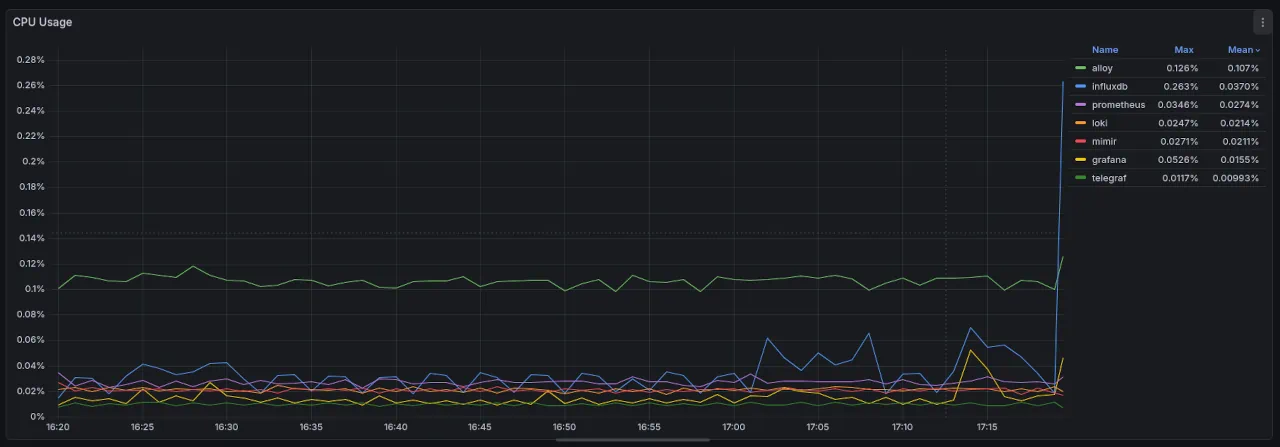
Panel, CPU Usage, Reflection
Dashboard: cAdvisor [historic]
Panel: CPU usage
Data source: InfluxDB
Far more verbose query requirements in InfluxDB Flux.
Final solution uses an experimental module, which can be changed or removed at any moment.
Even with this, we can't seem to replicate the same numbers for the visualisation.
| Solution  | Name       | Mean    | Max      | Max Difference |
| --------- | ---------- | ------- | -------- | -------------- |
| PromQL    | alloy      | 0.111%  | 0.107%   | 0 (control)    |
| Influx, A | alloy      | 0.177%  | 0.108%   | 0.067%         |
| Influx, B | alloy      | 0.126%  | 0.107%   | 0.015%         |
| --------- | ---------- | ------- | -------- | -------------- |
| PromQL    | influx     | 0.0442% | 0.0319%  | 0 (control)    |
| Influx, A | influx     | 0.112%  | 0.0336%  | 0.0678%        |
| Influx, B | influx     | 0.263%  | 0.0370%  | 0.2188%        |
| --------- | ---------- | ------- | -------- | -------------- |
| PromQL    | prometheus | 0.0286% | 0.0270%  | 0 (control)    |
| Influx, A | prometheus | 0.0510% | 0.0274%  | 0.0224%        |
| Influx, B | prometheus | 0.0346% | 0.0274%  | 0.0060%        |
| --------- | ---------- | ------- | -------- | -------------- |
| PromQL    | loki       | 0.0223% | 0.0214%  | 0 (control)    |
| Influx, A | loki       | 0.0384% | 0.0216%  | 0.0161%        |
| Influx, B | loki       | 0.0247% | 0.0214%  | 0.0024%        |
| --------- | ---------- | ------- | -------- | -------------- |
| PromQL    | mimir      | 0.0215% | 0.0211%  | 0 (control)    |
| Influx, A | mimir      | 0.0338% | 0.0213%  | 0.0123%        |
| Influx, B | mimir      | 0.0271% | 0.0211%  | 0.0056%        |
| --------- | ---------- | ------- | -------- | -------------- |
| PromQL    | grafana    | 0.0199% | 0.0142%  | 0 (control)    |
| Influx, A | grafana    | 0.0676% | 0.0156%  | 0.0477%        |
| Influx, B | grafana    | 0.0526% | 0.0155%  | 0.0427%        |
| --------- | ---------- | ------- | -------- | -------------- |
| PromQL    | telegraf   | 0.0104% | 0.00995% | 0 (control)    |
| Influx, A | telegraf   | 0.0144% | 0.0100%  | 0.0040%        |
| Influx, B | telegraf   | 0.0117% | 0.00993% | 0.0013%        |
| --------- | ---------- | ------- | -------- | -------------- |
InfluxDB variation B is statistically better performing, with the only outlier being the "influx" service showing a 5x variation.
The trends displayed also vary across the solutions, and across the two data sources.
PromQL
InfluxDB / A
InfluxDB / B
The calculation inconsistency, the trends variation, and the difficulty of the implementation, makes this port a "FAIL".
Whilst assessing our ability to port PromQL dashboards to InfluxDB data source, if one more "FAIL" occurs we will have to declare the port as a fail also.
Panel, Container Restarts, Prometheus
Dashboard: cAdvisor
Panel: Container Restarts
Data source: Prometheus
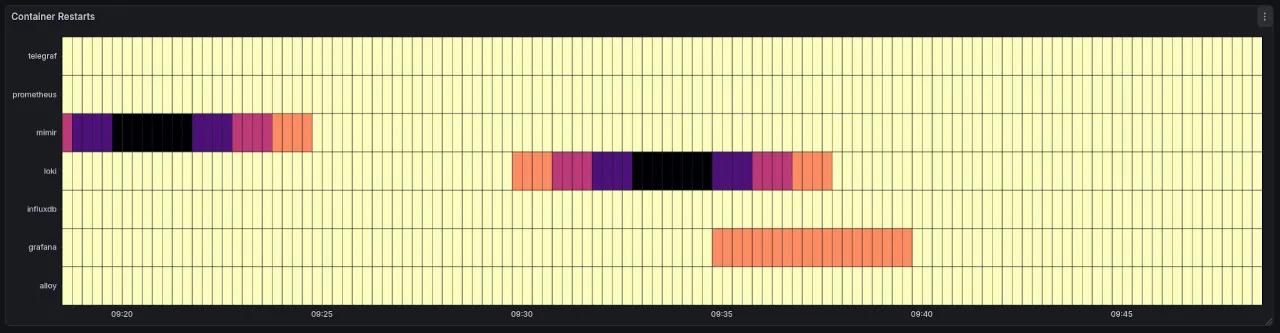
The PromQL query:
sum by (name) (count_over_time(
  (changes(container_last_seen{name=~".+"}[1m])>0)
  [5m:1m]
))
The easiest way to think about this is as a heartbeat. Every minute your Prometheus scraping job will record 4 sets of metrics, since my scrape interval is 15s. That gives us a heartbeat per minute of 4.
Next step is to use the cAdvisor "container_last_seen", a timestamp.
time() - container_last_seen{name=~".+"}
Subtracting that last seen timestamp from current time, and calling that query will return a value between 0.00 to 15.00, because 15s is our scraping interval.
The next step is to track changes of that value. Since we want heartbeats / minute we set the range to [1m]. Counting the "changes()" of container_last_seen across a 1m time window will usually return 3; we are counting the changes or gaps between 4 points, not the points themselves.
This gives us an effective bpm. For the visualization, we actually want to see issues with a container, and restarts. To do that we need to add another window of time analysis to our bpm, essentially answering "how's our container heartbeat over 5m?". If it dips, it signifies a health issue.
To achieve this we count the change over a 5m window at a 1m resolution [5m:1m] using "count_over_time". This should nominally return 5, as in the "container was last seen 5 times in 5 minutes" aka container is alive. Any value lower than 5 is symptomatic of issues, and the closer we get to 0 the more likely the container is restarted, throttled, stopped, or crashed.
The final "sum by (name)" tidies the data to group by name.
One final tweak is "changes()>0", which increases our resolution. Changes will be 0 if the container has not been seen for 1m. You might be thinking "but we're discarding values, how are we increasing the resolution?". Well, the "changes()" output is used within a "count_over_time()", when changes is 0 we still count it so we actually will get a 5 count over 5m window.
When we add the ">0" to changes we now get a 4 from "count_over_time", which will show up in the visualization as symptomatic. For example, in the above chart there's the grafana service, which reported 4 bpm for a period, the container was stopped, but reporting was laggy.
Why use a heatmap for discrete events?
Normally restart events are discrete events, but sadly I haven't found a native way to ingest the Docker events with this system. I know you can add an exporter service or write your own, but I wanted to make use of what I had.
I think if I had access to restart events, I would not use a "Heatmap", I'd use a "Time series" visualization, a better way to show discrete events.
In this case, we are tracking the volume of BPM, and want to see decreases since they are linked to health symptoms. A heatmap is adequate here.
Prometheus custom metrics
In Prometheus you can define 2 types of rules, recording and alerting rules. Because the above heartbeat might be a useful reusable metric I'd like to define it as a custom metric via a recording rule.
First define the rule file location in the global Prometheus config.
rule_files:
  - "rules/container_heartbeat.yml"
Then define the container_heartbeat.yml recording rule, here using the same expression detailed above.
groups:
  - name: container_heartbeat
    interval: 1m
    rules:
      - record: container_heartbeat:bpm
        expr: (changes(container_last_seen{name=~".+"}[1m])>0)
The interval here is just an extra optimisation point, we're only running / recording the new metric every minute. We don't need finer granularity.
Recording rules allow you to precompute frequently needed or computationally expensive expressions and save their result as a new set of time series. Querying the precomputed result will then often be much faster than executing the original expression every time it is needed. This is especially useful for dashboards, which need to query the same expression repeatedly every time they refresh.
Not a big concern here, but nice to try it for something low effort, from Prometheus, Defining Rules
With this we can now change the above PromQL query to:
sum by (name) (count_over_time(
  container_heartbeat:bpm
  [5m:1m]
))
Panel, Container Restarts, InfluxDB
Dashboard: cAdvisor [historic]
Panel: Container Restarts
Data source: InfluxDB
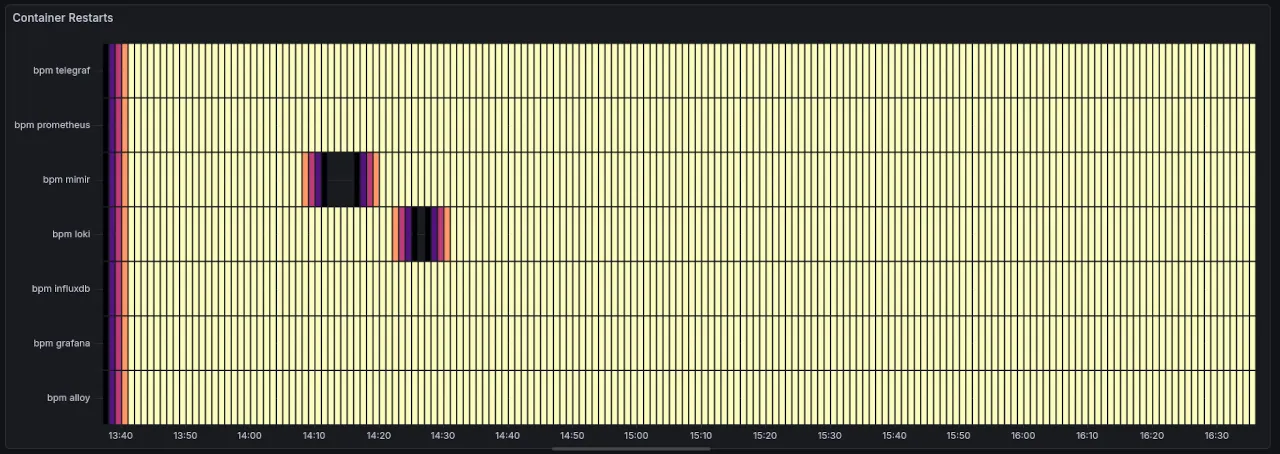
For reference the Prometheus version for the same time range
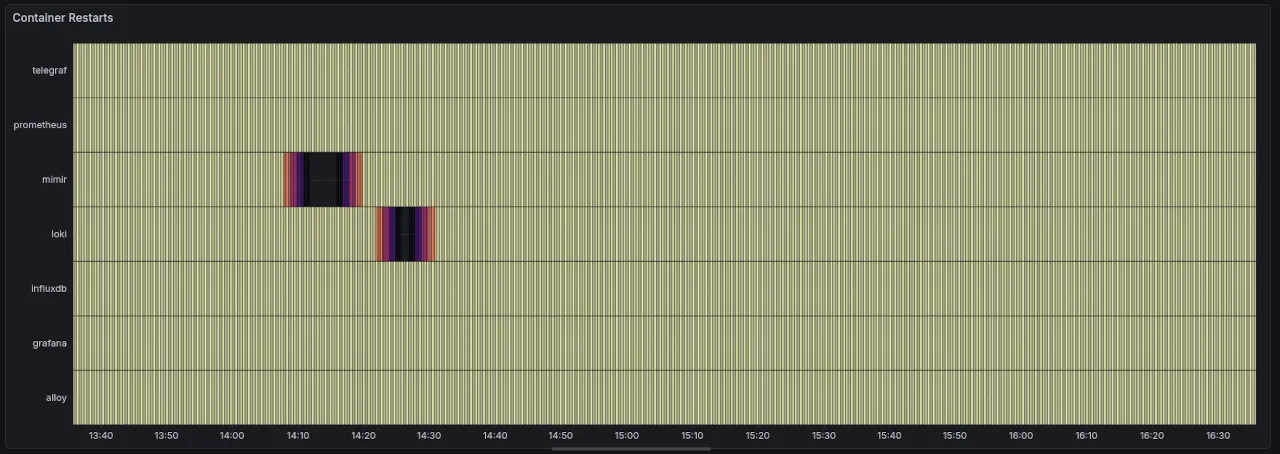
The visual differences you see are just a rendering issue cause by the amount of points visualized, and you'll notice it on the InfluxDB panel in the next section.
from(bucket: "metrics")
  |> range(start: v.timeRangeStart, stop: v.timeRangeStop)
  |> filter(fn: (r) => r._measurement == "prometheus_remote_write")
  |> filter(fn: (r) => r._field == "container_last_seen")
  |> filter(fn: (r) => exists r.name)
  |> difference()
  |> aggregateWindow(every: 1m, fn: count, createEmpty: false)
  |> aggregateWindow(every: 1m, period: 5m, fn: count)
  |> rename(columns: {_value: "bpm"})
  |> group(columns: ["name"])
First steps are of course the filters: by metric, by field, only valid name data.
"difference()" here calculates the change between points, similar to "change()" from PromQL.
We expect from "difference()" 3 items, given we have narrowed our range to 1m. To test this for InfluxDB we'd actually have the set the Data Explorer time dropdown to 1m vs Prometheus [1m] range setting.
"difference()" correctly returns a table / name, as expected, and the spaces between each points, as [15, 15, 15] across the rows under "_value".
PromQL "change()" returns the amount of changes, 3, the size of the array of changes, not the values themselves.
Lets aggregate the count for a 1m time window:
|> difference()
|> aggregateWindow(every: 1m, fn: count, createEmpty: false)
This correctly returns the tables / name, but within each table we get 2 rows: one with 0 and one with the count we expect, 3.
To drop these empty rows, we use the "createEmpty" param.
Next we need to count up all 1m window changes.
|> aggregateWindow(every: 1m, fn: count, column: "has_changed", createEmpty: false)

|> aggregateWindow(every: 1m, period: 5m, fn: count)
We use "period" to define the sliding window for aggregation, 5m, and every to define how often we're counting, every minute.
Finally we rename the "_value" column to get a tidier response.
Panel, Container Restarts, Reflection
InfluxDB does not currently support visualizing Prometheus histogram metrics as a traditional histogram.
I was initially worried that the "Container Restarts" visualization would not be achievable with InfluxDB queries, but I think they mean "natively" not supported in the InfluxDB Data Explorer since they cover examples of how to query histograms.
InfluxDB, Work with Prometheus Histograms
Worth saying that the Prometheus panel, is not actually using a histogram dataset, rather a Counter.
Possibly there's an extra lesson here about the value of a histogram, and it's "dos and donts". In theory, the use for container restarts is daft, since restarts are discrete events. A time series is better for this. Yet the way the data was diced up or downsampled made it possible and not horrible to use a heatmap, showing us a clear picture of health issues across our system.
What will it be like to deal with REAL histogram dataset, remains to be seen. The docs cover one such example using prometheus.histogramQuantile from "experimental/prometheus" and looks promising once downsampling has happened. Yet it is an experimental package, and that comes with a stern warning.
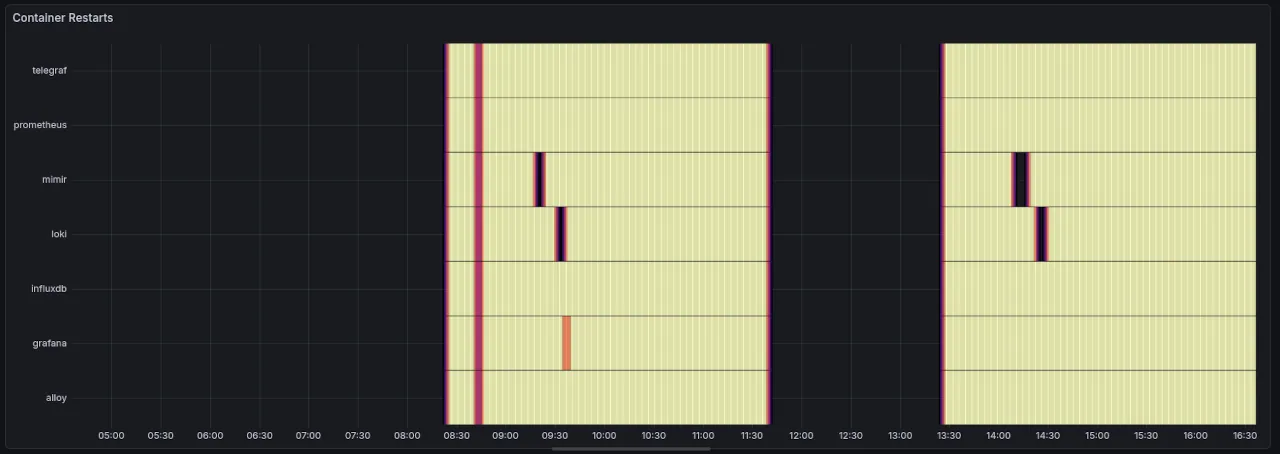
More visualization concerns with InfluxDB where the beginning of the chart is darker. This doesn't happen in the Prometheus panel, and is likely to do with how the queries run or return differently across the datasources.
Further it seems like finer changes in the trends are lost at longer timeframes: watch careful how some flakyness in the grafana service doesn't display in InfluxDB, whilst showing in Prometheus.
Prometheus:
InfluxDB:
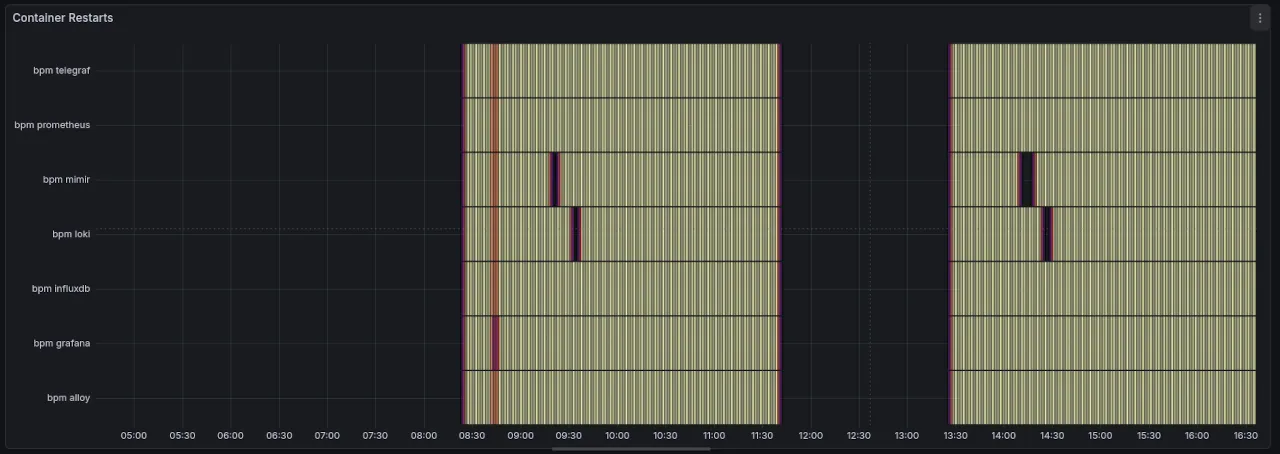
Also notice the colour rendering issue we saw above.
The InfluxDB Flux query itself is almost 3x larger than PromQL, and not as easy to reason about. It's also using 3x filter() and 2x aggregateWindows() which are likely to be slower than PromQL. Benchmarking evidence is required to validate this claim.
The output of the query, is indeed closer to PromQL and for that I consider this step a "PASS"
Conclusion
Should you use InfluxDB for long-term Prometheus storage?
InfluxDB would want you to, and offer enough info to make your life easier. It's also possible that v3 is better in some respects, although the query process seen above will be similar.
There is labor involved in crafting the queries such that they align across the two systems. They are not carbon copies!
That labor requires knowledge of both Prometheus and InfluxDB. Enough knowledge that I don't think someone can complete a port without a high amount of effort and focus.
I'd rather use a long-term storage system with native PromQL support.
Dealing with data and trend mismatch is painful, even once you've created the queries across the two systems. Although I'll add the caveat that it could also be a skill issue on my part.
I stopped porting 6 panel visualizations because they all used a combination of rate() and sum(). The findings from CPU Usage panel will likely repeat across all of these.
In CPU Usage the reported data variations between Prometheus and InfluxDB were between 2-6x.
How can I justify to management that our audit data is 2-6x different than our daily data. It would certainly be a difficult thing to defend in a fictional court situation.
And because of that... the labor, the query data inconsistencies, and the possible performance differences... InfluxDB is not my choice of long-term storage for Prometheus.
"Horses for courses" as they say.
I hope you do consider it for your use case, and may this analysis be enough to get you up and running.