Prometheus Long-term Storage, Mimir
In the last post I discussed what it's like to use InfluxDB as a long-term storage option for Prometheus, Prometheus Long-term Storage, this same blog.
Spoiler: I didn't think it was worth it.
To use InfluxDB you had to implement your own versions of PromQL functions and, of course, they produced different results. The CPU Usage panel was as an example of such query, where a minor time range variance (acceptable at that scale), caused big long-term deviations in totals.
Trends were also impacted by this variance.
Then there was the labor, you have to craft these queries.
Then there were the theoretical issues to do with query performance. At the time I bypassed this talking point because I didn't have benchmarks.
I still don't have any new benchmarks on this, but I'm using the observed rates for the InfluxDB and Telegraf. I've recently tried to produce a 7days view using the InfluxDB data and the spikes in resource use are there. I also hit a memory issue in Grafana, the InfluxDB panel needs to render too many points and as such the query is blocked or timed out.
Sure, we can fix it with down-sampling, but will we need to do this for every visualization? We can also use a Prometheus rule to compute and record new down-sampled metrics on the fly.
We don't have these issues with Prometheus visualizations, which are presumably downsampled by the included functions.
Mimir
Grafana Mimir is designed to be long-term storage option for Prometheus. It's another open source solution, and features integrations with cloud providers.
In terms of performance, as observed coarsely on my system, it uses up 4x more CPU than Telegraf and 10x less CPU than InfluxDB.
It also supports PromQL out of the box, making the Grafana setup super easy.
Setup
Starting at the metric collector, aka Grafana Alloy.
prometheus.remote_write "mimir" {
  endpoint {
    url = "http://mimir:9009/api/v1/push"
  }
}

...

prometheus.scrape "scraper" {
  targets    = discovery.relabel.cadvisor_rename.output
  forward_to = [ prometheus.remote_write.main.receiver, prometheus.remote_write.telegraf.receiver, prometheus.remote_write.mimir.receiver ]

  ...
}

...
Very simple change to introduce Mimir as another target for the Prometheus scraper.
The Mimir config itself.
[mimir-config.yml]
multitenancy_enabled: false

blocks_storage:
  backend: filesystem
  bucket_store:
    sync_dir: /data/tsdb-sync
  filesystem:
    dir: /data/blocks
  tsdb:
    dir: /data/tsdb

compactor:
  data_dir: /data/compactor
  sharding_ring:
    kvstore:
      store: memberlist

limits:
  # Delete from storage metrics data older than 2 months.
  compactor_blocks_retention_period: 60d
  # Process metric with timestamps of a wider time delay
  out_of_order_time_window: 5m

distributor:
  ring:
    instance_addr: 127.0.0.1
    kvstore:
      store: memberlist

ingester:
  ring:
    instance_addr: 127.0.0.1
    kvstore:
      store: memberlist
    replication_factor: 1

ruler_storage:
  backend: filesystem
  filesystem:
    dir: /data/rules

server:
  http_listen_port: 9009
  grpc_listen_port: 9080
  log_level: error

store_gateway:
  sharding_ring:
    replication_factor: 1
'block_storage', 'compactor', 'ruler_storage' the paths were updated to a standardised path 'data/*'.
Mimir uses a distributed network to allow nodes to gossip, but here we specified a single node via the 'store_gateway.sharding_ring.replication_factor', and 'multitenancy_enabled'.
The 'ingested' and 'distributer' still required this network config, and they along with the 'compactor' use a key store for encrypted comms.
'block_storage.backend' set to 'filesystem', where you can also configure Grafana Cloud, AWS S3, or GCP storage.
The 'limits.*' set the retention to 60days, adjust the 'out of time' window in case processing of samples is delayed past the default.
We originally wanted to be able to report from long-term storage at 30d intervals so 60d grants us a bit of buffer.
Crucial is the 'http_listen_port', which is where Alloy posts the metrics.
Next up is the container setup itself.
[docker-compose.yml]
  mimir:
    image: grafana/mimir-alpine
    container_name: mimir
    ports:
      - "9009:9009"
    command:
      - "-config.file=/etc/mimir/mimir.yaml"
    volumes:
      - ./configs/mimir-config.yml:/etc/mimir/mimir.yaml:ro
      - ./data/mimir:/data:rw
    healthcheck:
      test: ["CMD", "wget", "--no-verbose", "--tries=1", "--spider", "http://localhost:9009/ready"]
      interval: 10s
      timeout: 30s
      retries: 5
    networks:
      - grafana-monitoring

   grafana:
    container_name: grafana
    depends_on:
      mimir:
        condition: service_healthy
Simple config exposing the post, bind mounting the config and the output data, and adding a healthcheck via the '/ready' api. The Grafana container depends on this health check.
And for the Grafana config I'll share the data source
[grafana/provisioning/datasources/mimir.yml]
apiVersion: 1

datasources:
  - name: Mimir
    type: prometheus
    orgId: 1
    url: http://mimir:9009/prometheus
    jsonData:
      httpMethod: POST
      prometheusType: Mimir
      cacheLevel: 'High'
      timeInterval: 15s # Prometheus scrape interval
      incrementalQueryOverlapWindow: 10m
Very similar to the recommended Prometheus config. I've not seen an official reference config, but this does the trick.
The core part is the 'url' suffix of '/prometheus', which is just a proxy for '/'. The Mimir API contains other paths and to avoid any endpoint clashes they with other non-Prometheus endpoints they by default prefix the query API, the main show, with the default '/prometheus'. You can set your own suffix with a CLI flag.
Results
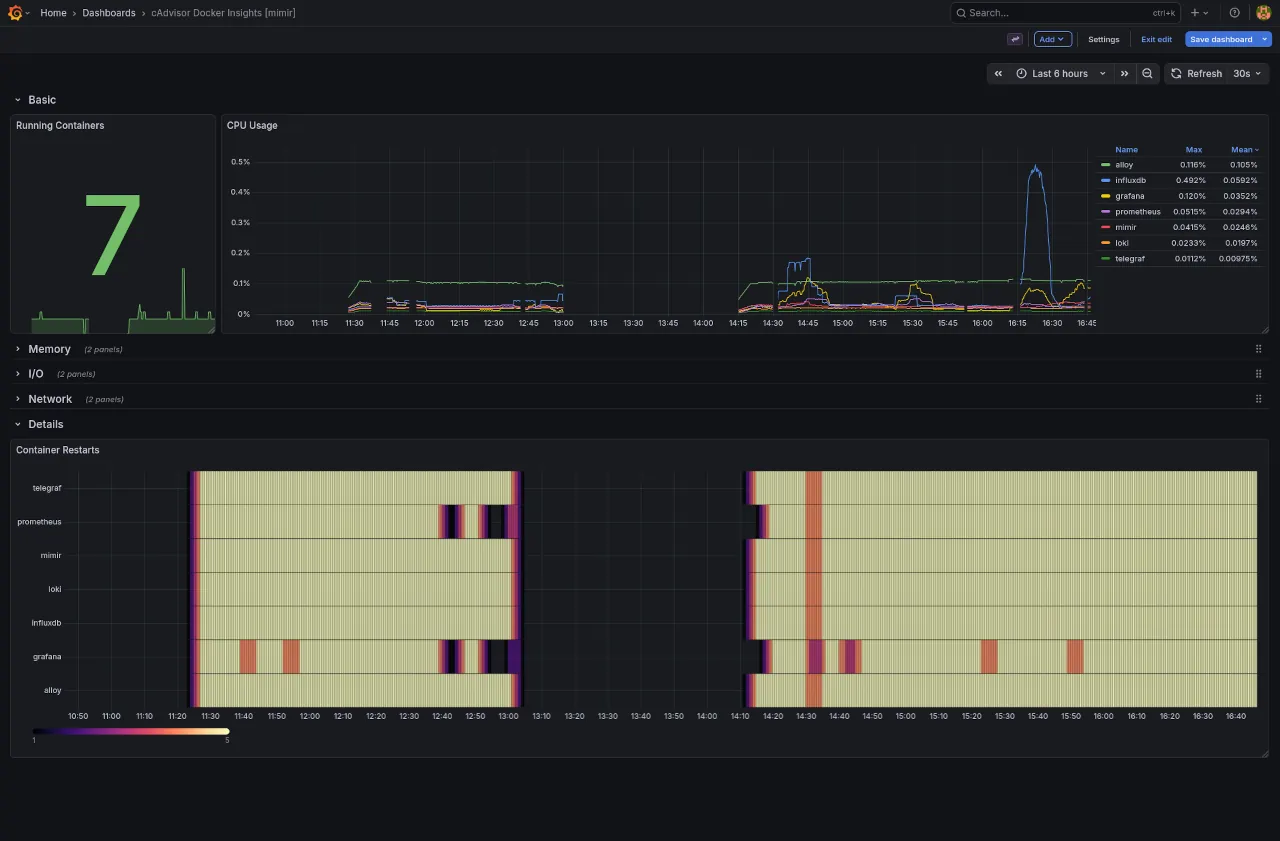
Grafana Mimir is a lot more comfortable to use as a long-term Prometheus store, because of the native PromQL support.
The InfluxDB dashboard for reference.
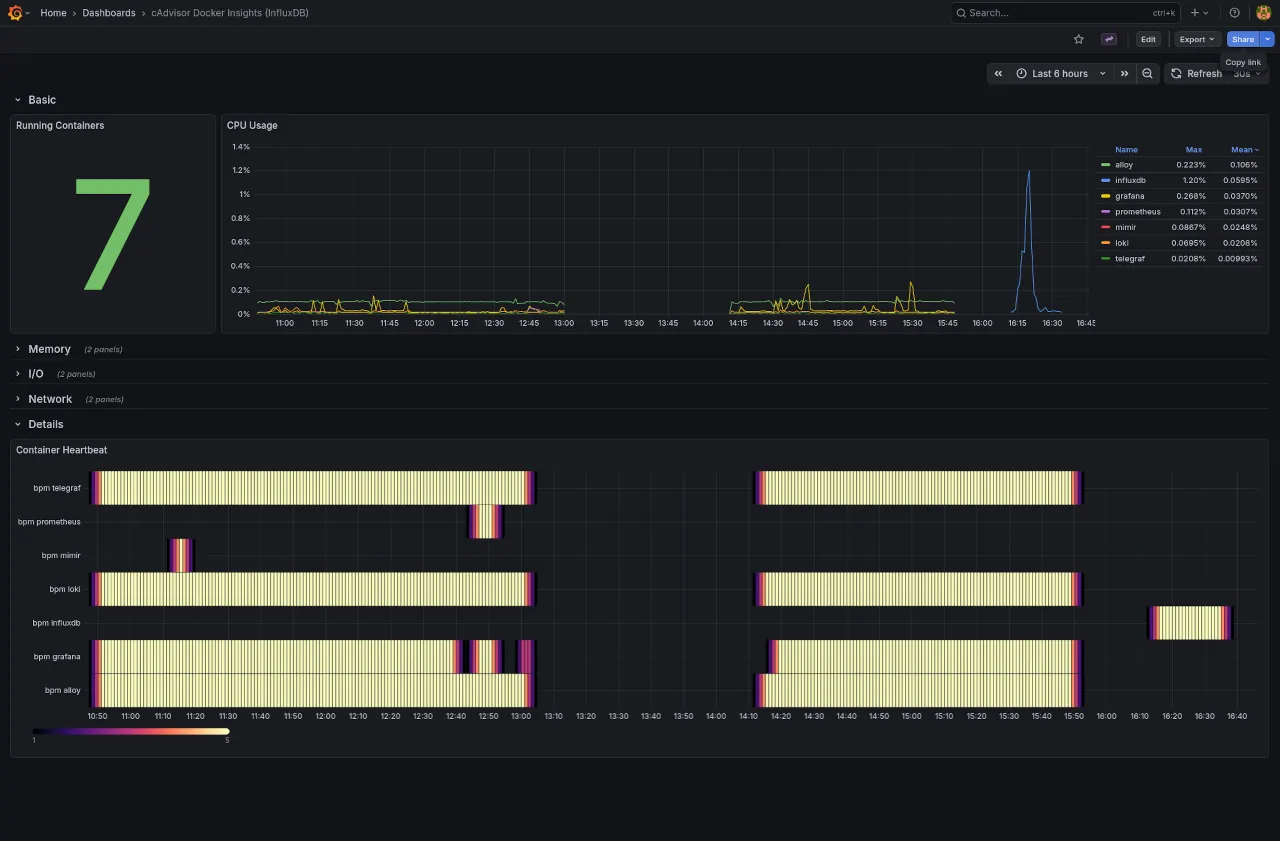
You can see here the differences in totals across the two solutions at a wider time frame of 6h. The InfluxDB query is wildly off.
Also clear to see the trend differences, with more noticeable spikes from the Mimir query.
And the native sampling produces as better heatmap resolution.
Conclusion
There's a lot to love about Mimir, and for the home lab I'll continue to use it. The PromQL support just fixes everything, and I don't understand why InfluxDB doesn't add it also.
Mimir suggests that the 'file storage' option is experimental and for development use only. The docs also point out how non-POSIX filesystems are not supported aka AWS Elastic File Store (EFS). Curious if this will extend to AWS wrapper services.
In production I'd configure the AWS S3 option or Grafana Cloud, but that will be another post for another day.
Hope you learned something new about Prometheus long-term storage, from reading this.
Next up
Planning to talk about a modern observability setup in 2026.
I've seen a few videos, posts, and resources where the authors skip over provisioned authentication, bind mounting, and in general favour UI config vs infrastructure-as-code.
Should be able to show and tell how to provision an entire modern monitoring stack with code, along with all the mandatory "dos and donts" ramblings and links to docs.
If you're interested, subscribe to the RSS feed.